
Flozoflozo support
KnowledgebaseSubmit a ticket
Flozo.ai Sign in
© 2026 Flozo.ai · Support Center
Flozo AISubmit TicketView TicketsPrivacy Policy
Chatbuddy
Chatbuddy

How to Update a Business’s Name?

Updated May 13, 2026 at 10:27 AM
  1. From the main navigation menu, go to Settings > General.

  2. At the top of the page, locate the Business Name.

  3. Click the Edit (Pen) icon next to the business name.
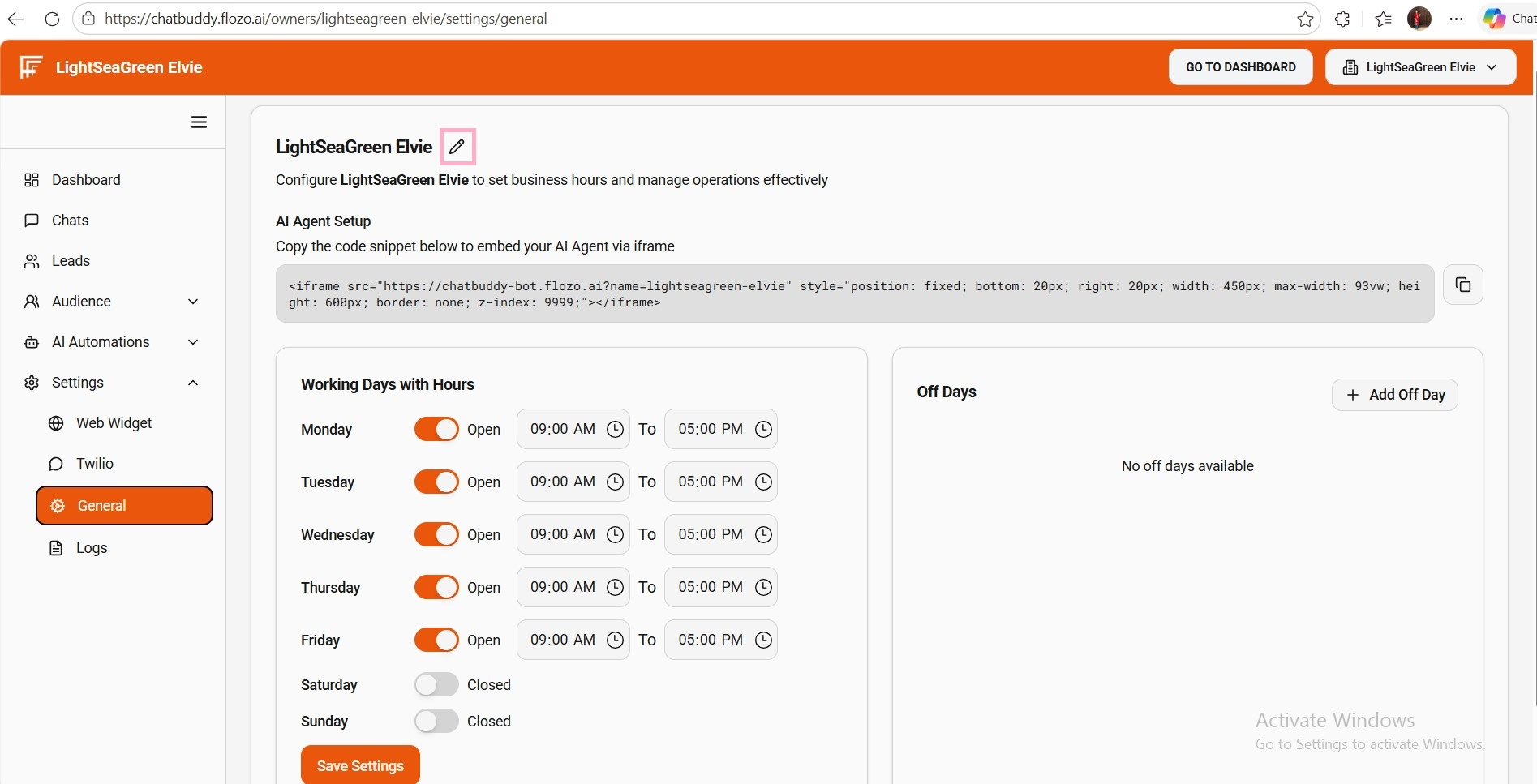
  4. Enter the desired business name.

  5. Click the Confirm icon to save.

  6. The updated business name will be reflected across all pages.

Related Articles

  • How to Update a Business Name?
  • How to Update Business Owner Profile?
  • How to Update Password?
  • How to Update Agent Status?
  • How to Update a Business Name?

Browse Categories

Flozo(19)Chatbuddy(40)QuotePilot(20)Workmate(34)

Was this article helpful? Still need help?

Submit a ticket