
Flozoflozo support
KnowledgebaseSubmit a ticket
Flozo.ai Sign in
© 2026 Flozo.ai · Support Center
Flozo AISubmit TicketView TicketsPrivacy Policy
Chatbuddy
Chatbuddy

How to Assign Tag to Contact(s)?

Updated May 13, 2026 at 10:07 AM
  1. From the main navigation menu, select Audience > Contacts.

  2. All contacts are listed here, including those added manually and via webchat.

  3. Select one or more contacts using the checkboxes.

  4. Click the Assign Tag icon at the top.
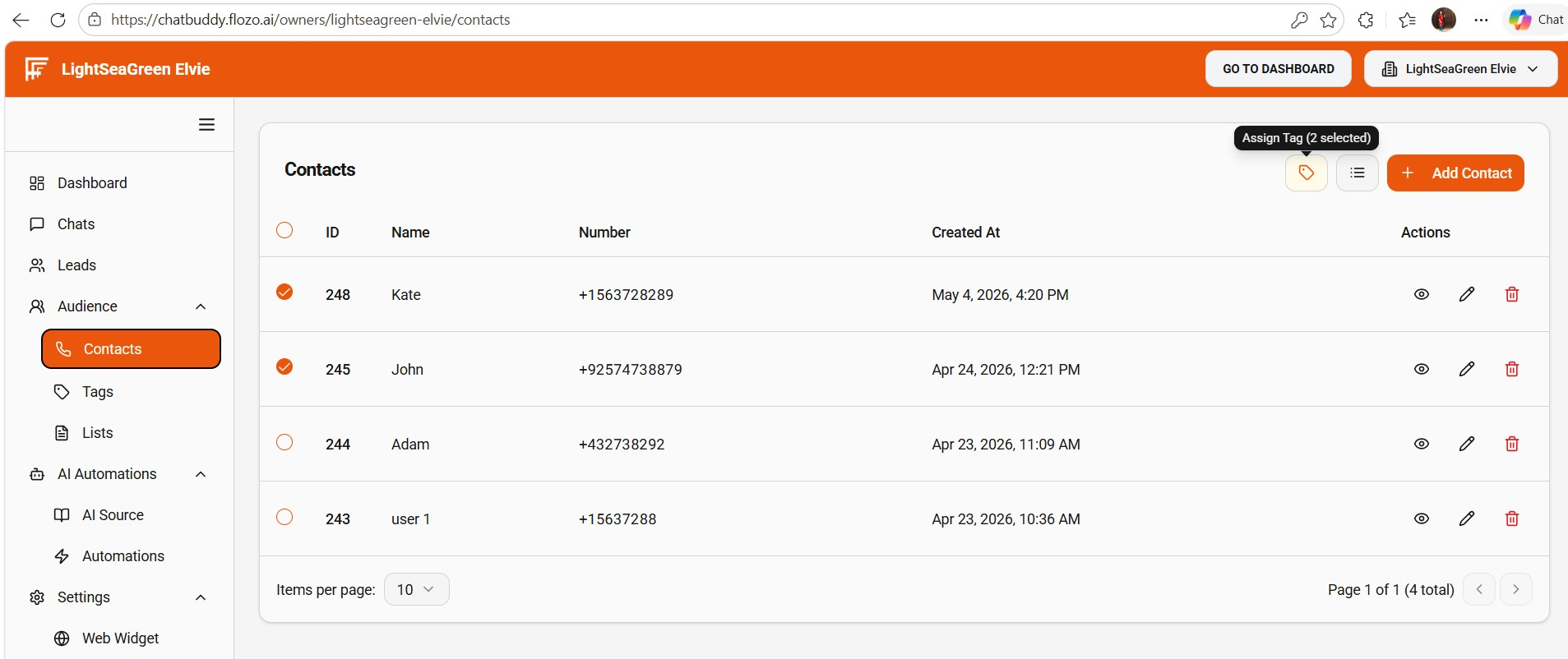
  5. Choose the tag you want to assign from the dropdown.

  6. Click Submit.

  7. The selected tag will be assigned to the chosen contact(s).

Related Articles

  • How to Add Contacts to a List?
  • How to Add a New Tag?
  • How to Edit an Existing Tag?
  • How to View Tagged Contacts?
  • How to Remove Tag from Contact(s)?

Browse Categories

Flozo(19)Chatbuddy(40)QuotePilot(20)Workmate(34)

Was this article helpful? Still need help?

Submit a ticket