
Flozoflozo support
KnowledgebaseSubmit a ticket
Flozo.ai Sign in
© 2026 Flozo.ai · Support Center
Flozo AISubmit TicketView TicketsPrivacy Policy
Workmate
Workmate

How to Start a Webchat Session in Workmate?

Updated May 14, 2026 at 4:42 AM
  1. From the main navigation menu, select Settings > AI Engine.

  2. Open the Deploy tab.

  3. Under the AI Agent Setup section, locate the Web Chat URL.
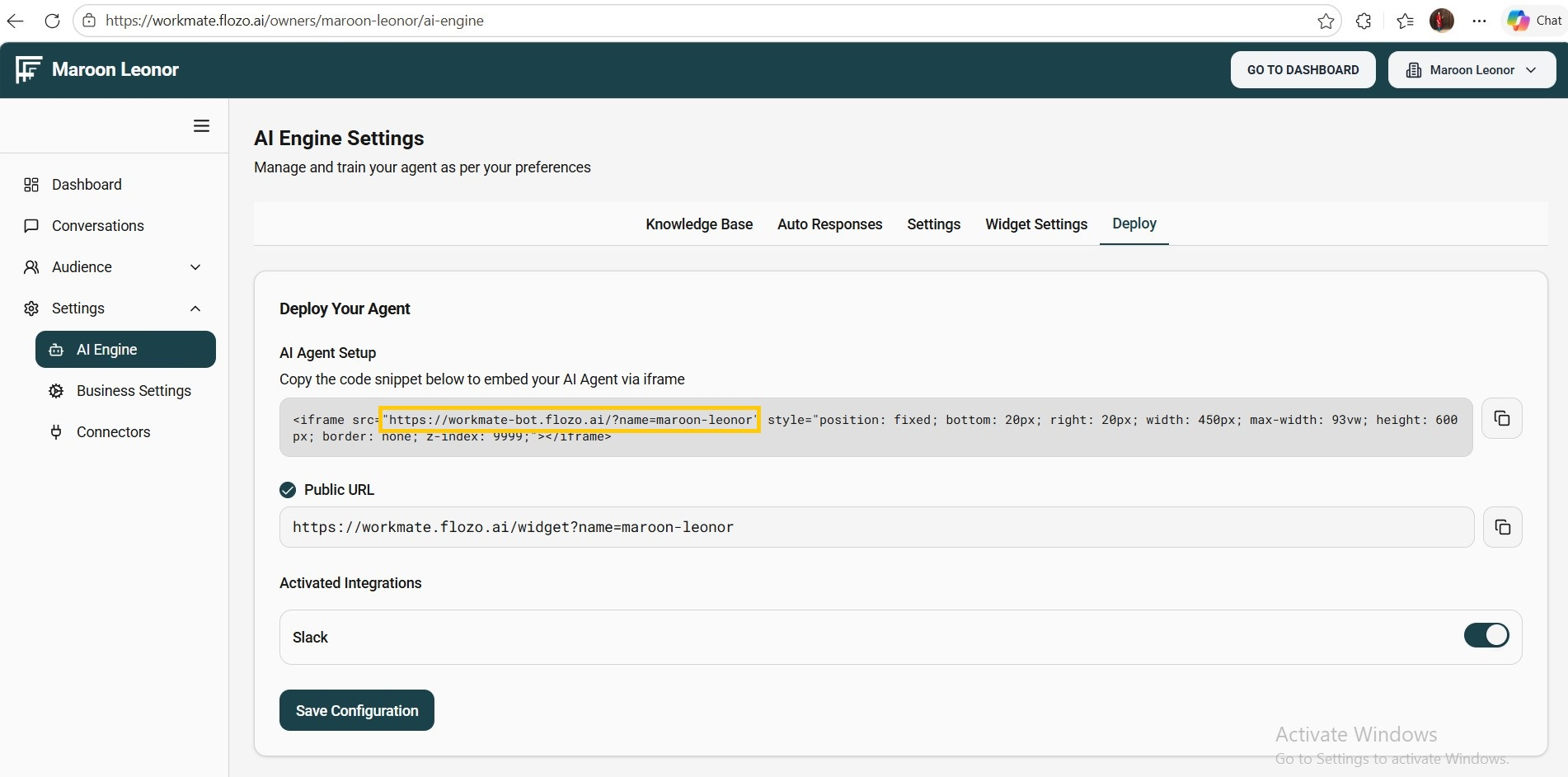
  4. Copy the URL and open it in an incognito window.

  5. When prompted, enter your Name and Contact details.

  6. Click Start Chat to initiate the chat and interact with the bot.


Note: Users who start a session via Web Chat will be automatically added to the Contacts list.

Related Articles

  • How to Start a WebChat Session?
  • How to Access the Agent Dashboard of Workmate?
  • How to Update Agent Status in Workmate?
  • How to try the AI Agent feature in Workmate?
  • How to Add a New Contact in Workmate?

Browse Categories

Flozo(19)Chatbuddy(40)QuotePilot(20)Workmate(34)

Was this article helpful? Still need help?

Submit a ticket