
Flozoflozo support
KnowledgebaseSubmit a ticket
Flozo.ai Sign in
© 2026 Flozo.ai · Support Center
Flozo AISubmit TicketView TicketsPrivacy Policy
Chatbuddy
Chatbuddy

How to View SMS & Call Logs for a Rule?

Updated May 14, 2026 at 4:26 AM
  1. From the main navigation menu, go to AI Bot Settings > Automations.

  2. Locate the relevant rule.

  3. Click the List icon under the Actions column.
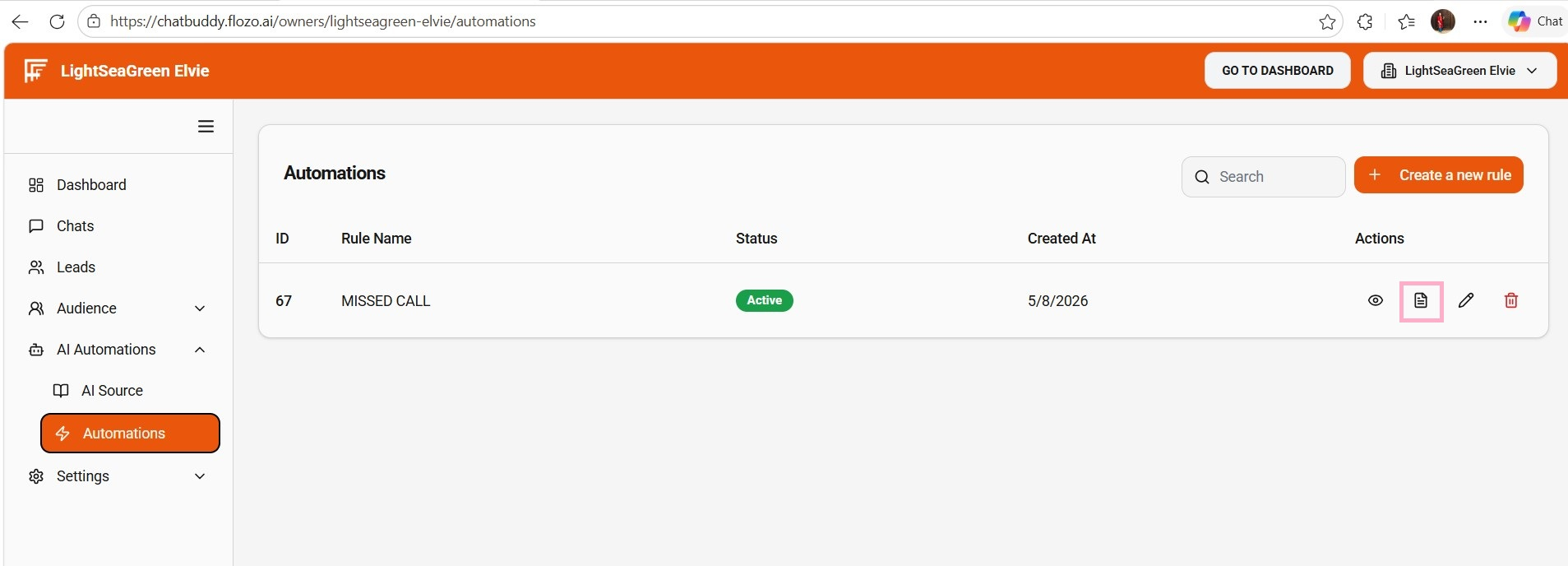
  4. The Log tab opens, showing all SMS and call logs related to that rule, with the following columns:

  • Rule ID

  • Message

  • Sent To

  • Sent From

  • Direction

  • Deliverable Status

  • Rule Name

  • Date Created

  • Actions (View Icon)

  1. Review any log entry as needed.

Related Articles

  • How to View the Created AI Agent?
  • How to View Active Subscriptions?
  • How to View Credit Logs?
  • How to View Payment Invoices?
  • How to View Quote Requests?

Browse Categories

Flozo(19)Chatbuddy(40)QuotePilot(20)Workmate(34)

Was this article helpful? Still need help?

Submit a ticket