Flozoflozo support
KnowledgebaseSubmit a ticket
Flozo.ai Sign in
© 2026 Flozo.ai · Support Center
Flozo AISubmit TicketView TicketsPrivacy Policy
QuotePilot
QuotePilot

How to Remove a Connected Email Account?

Updated May 13, 2026 at 11:38 AM
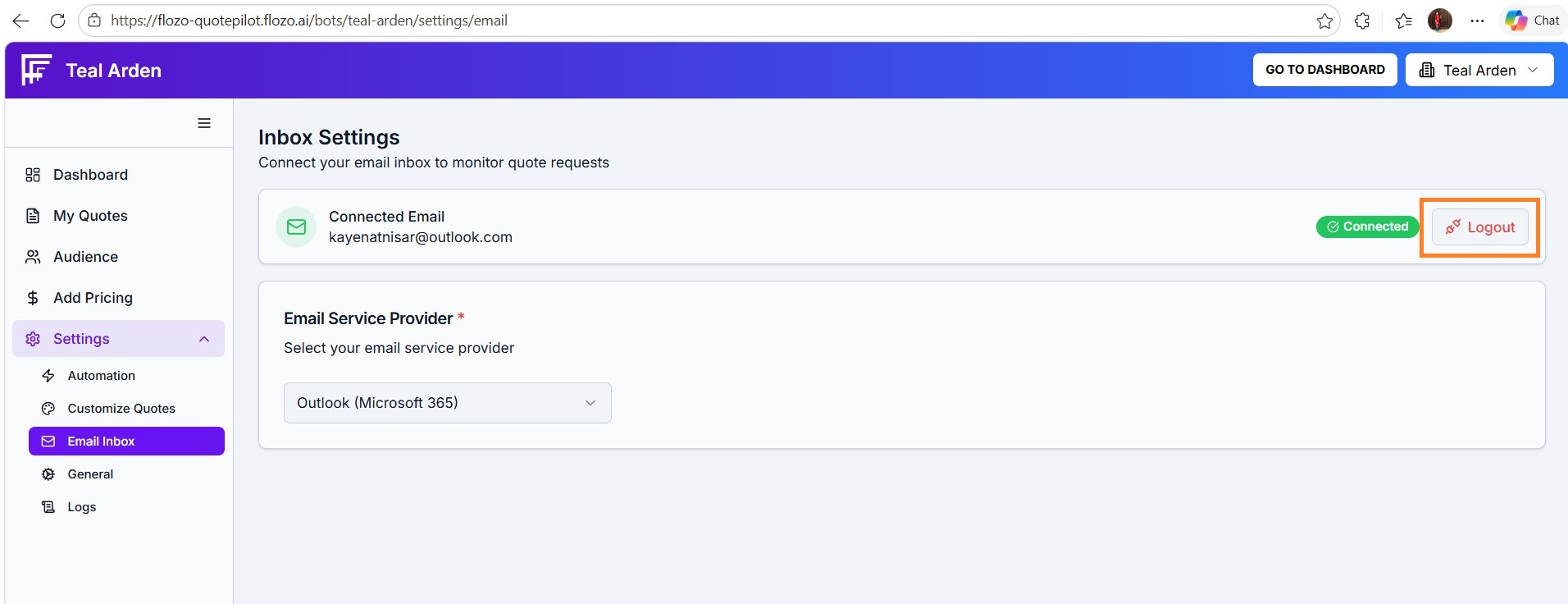
  1. If Outlook is already connected, a Logout Outlook button will appear along with the Connected Email field.

  2. Click the logout button.

  1. The connected email will be removed, and the system will revert to the default unconnected state.

Related Articles

  • How to Configure Other Email Services?
  • How to View Email Logs?
  • How to Remove Contact(s) from a List?
  • How to Remove Tag from Contact(s)?
  • How to Remove Tag from Contacts in Workmate?

Browse Categories

Flozo(19)Chatbuddy(40)QuotePilot(20)Workmate(34)

Was this article helpful? Still need help?

Submit a ticket