Flozoflozo support
KnowledgebaseSubmit a ticket
Flozo.ai Sign in
© 2026 Flozo.ai · Support Center
Flozo AISubmit TicketView TicketsPrivacy Policy
Workmate
Workmate

How to Add a New Tag in Workmate?

Updated May 14, 2026 at 4:43 AM
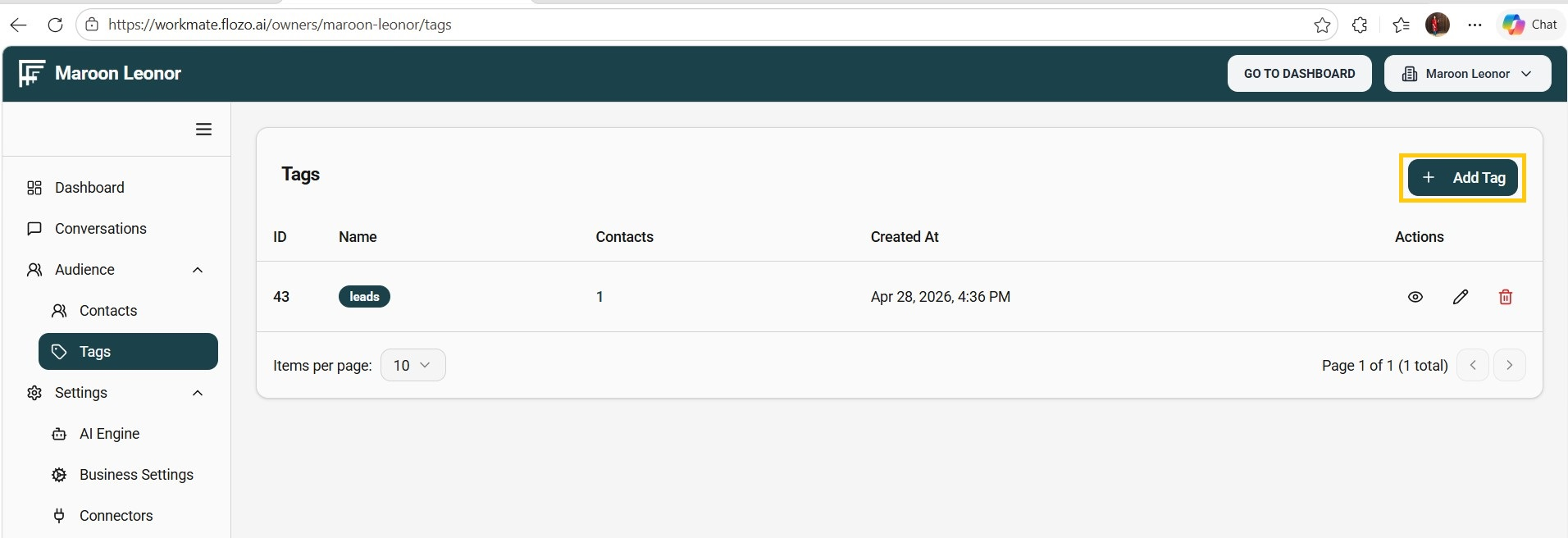
  1. From the main navigation menu, select Audience > Tags.

  2. Click the + Add Tag button.

  3. Enter the Tag Name.

  4. Click Add.

  5. The tag will be added to the tags list.

Note: When a contact fulfills certain criteria during conversations and is qualified as a lead, a “Leads” tag is automatically assigned and added to this list.

Related Articles

  • How to Add a New User?
  • How to Add a New Resource?
  • How to Generate a New Quote?
  • How to Add Business Information?
  • How to Add a New Automation Rule?

Browse Categories

Flozo(19)Chatbuddy(40)QuotePilot(20)Workmate(34)

Was this article helpful? Still need help?

Submit a ticket