
Flozoflozo support
KnowledgebaseSubmit a ticket
Flozo.ai Sign in
© 2026 Flozo.ai · Support Center
Flozo AISubmit TicketView TicketsPrivacy Policy
QuotePilot
QuotePilot

How to Save a Quote?

Updated May 13, 2026 at 11:45 AM
  1. Navigate to My Quotes from the main menu.

  2. Open any In Progress request.

  3. Review the AI generated quote and make edits if needed.

  4. Click Save Quote to store it for future use.
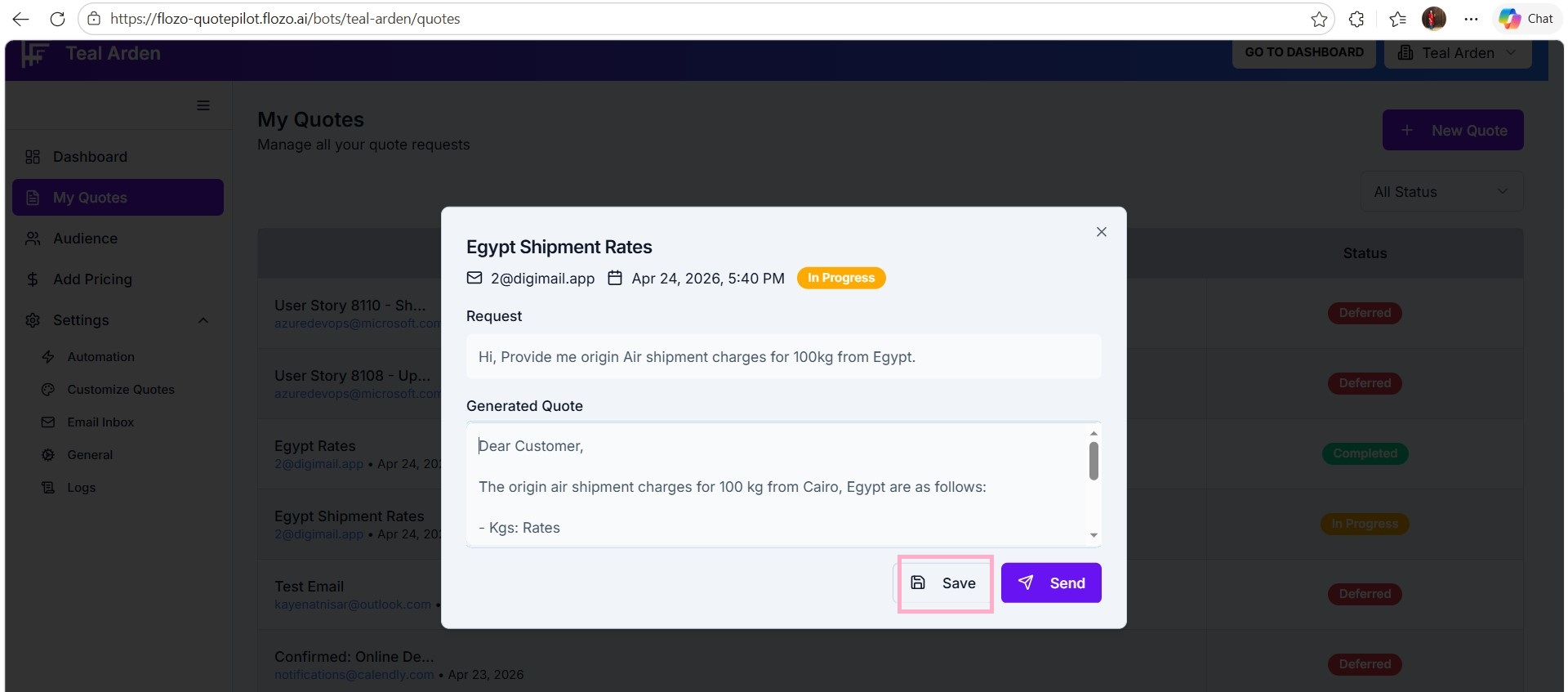

Note: Only quotes for In Progress emails can be saved.

Related Articles

  • How to Access the QuotePilot's Agent Dashboard?
  • How to Generate a New Quote?
  • How to View Quote Requests?
  • How to Send a Quote?
  • How to Add a New Resource?

Browse Categories

Flozo(19)Chatbuddy(40)QuotePilot(20)Workmate(34)

Was this article helpful? Still need help?

Submit a ticket