
Flozoflozo support
KnowledgebaseSubmit a ticket
Flozo.ai Sign in
© 2026 Flozo.ai · Support Center
Flozo AISubmit TicketView TicketsPrivacy Policy
QuotePilot
QuotePilot

How to Configure Automation Settings?

Updated May 13, 2026 at 11:37 AM
  1. From the main Navigation menu, go to Settings > Automation.

  2. In the Automation Behavior section, choose the desired response mode:

  • No Response: Emails are not read and quotes are not generated.

  • Semi-Automated: Quotes generate instantly, the owner can edit and send.

  • Autopilot: Quotes are generated and sent automatically.
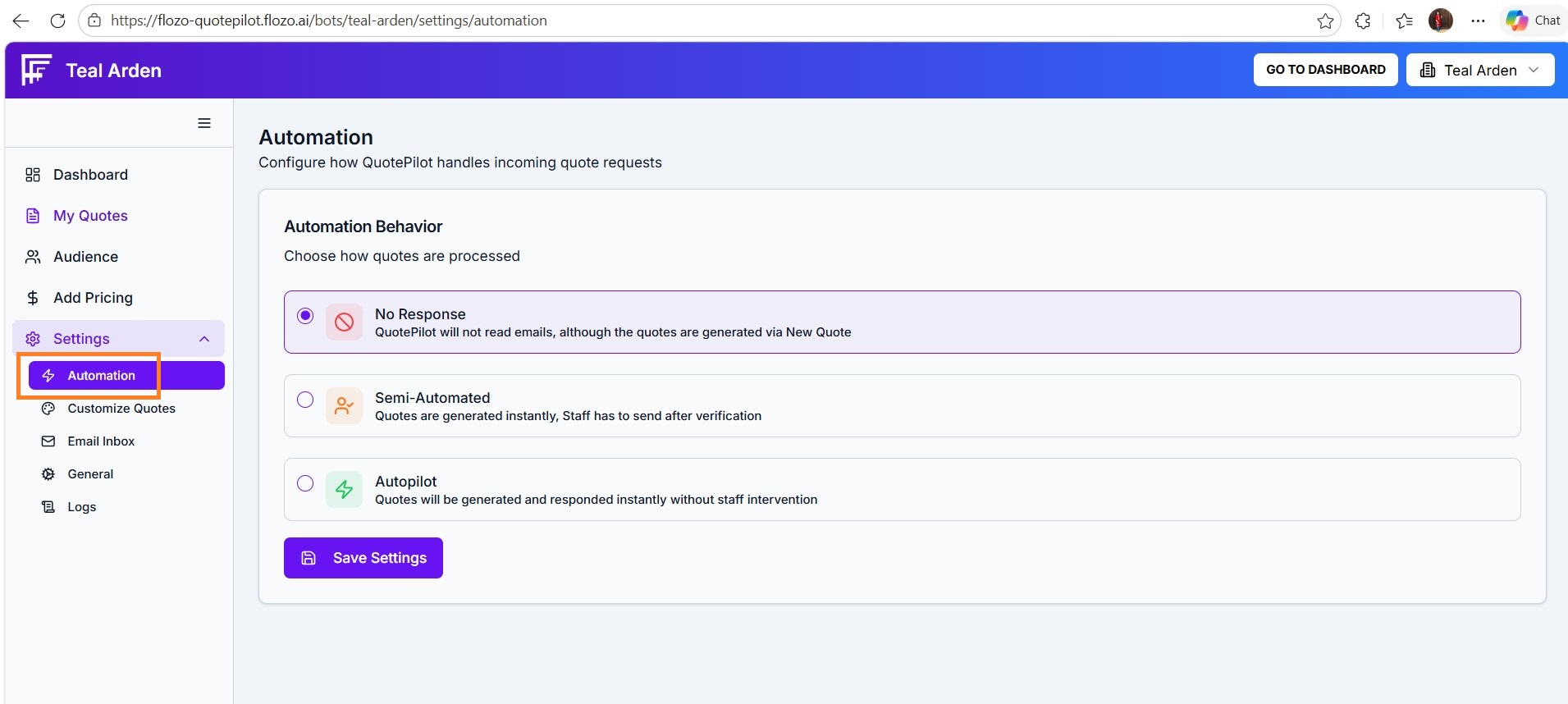
  1. Click Save Settings to apply the changes.

Note: All incoming emails will be handled according to the selected automation mode.

Related Articles

  • How to Access Inbox Settings?
  • How to Configure Other Email Services?
  • How to Configure Business Working Days?
  • How to Configure Timezone & Sign off settings?
  • How to Configure Twilio Settings?

Browse Categories

Flozo(19)Chatbuddy(40)QuotePilot(20)Workmate(34)

Was this article helpful? Still need help?

Submit a ticket