
Flozoflozo support
KnowledgebaseSubmit a ticket
Flozo.ai Sign in
© 2026 Flozo.ai · Support Center
Flozo AISubmit TicketView TicketsPrivacy Policy
Workmate
Workmate

How to Change Status for Public URL?

Updated May 14, 2026 at 4:39 AM
  1. From the main navigation menu, select Settings > AI Engine.

  2. Open the Deploy tab.

  3. In the Public URL section, review the status toggle.
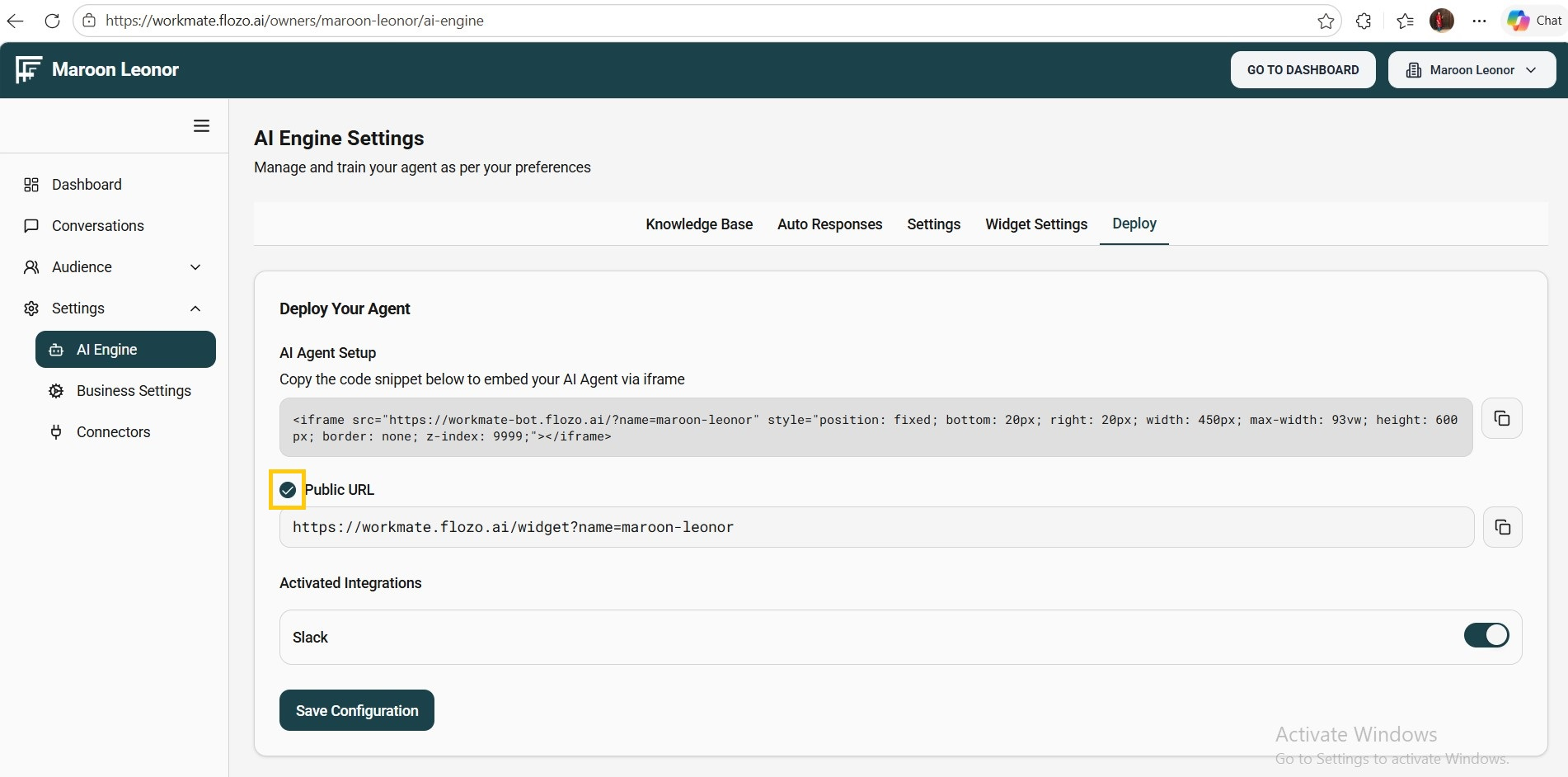
  4. Enable or disable the Public URL by checking/unchecking the toggle.

  5. Click Save Configuration.

Note: If the Public URL is disabled, users will no longer be able to start Agent Chat using that link.

Related Articles

  • How to Update Agent Status?
  • How to Update Agent Status?
  • How to Change the Status of Knowledge Resource?
  • How to Update Agent Status in Workmate?
  • How to Change Status for Auto Response?

Browse Categories

Flozo(19)Chatbuddy(40)QuotePilot(20)Workmate(34)

Was this article helpful? Still need help?

Submit a ticket