
Flozoflozo support
KnowledgebaseSubmit a ticket
Flozo.ai Sign in
© 2026 Flozo.ai · Support Center
Flozo AISubmit TicketView TicketsPrivacy Policy
Chatbuddy
Chatbuddy

How to Configure Business Working Days and Hours?

Updated May 13, 2026 at 10:29 AM
  1. From the main navigation menu, go to Settings > General.

  2. Locate the Working Days & Hours section.
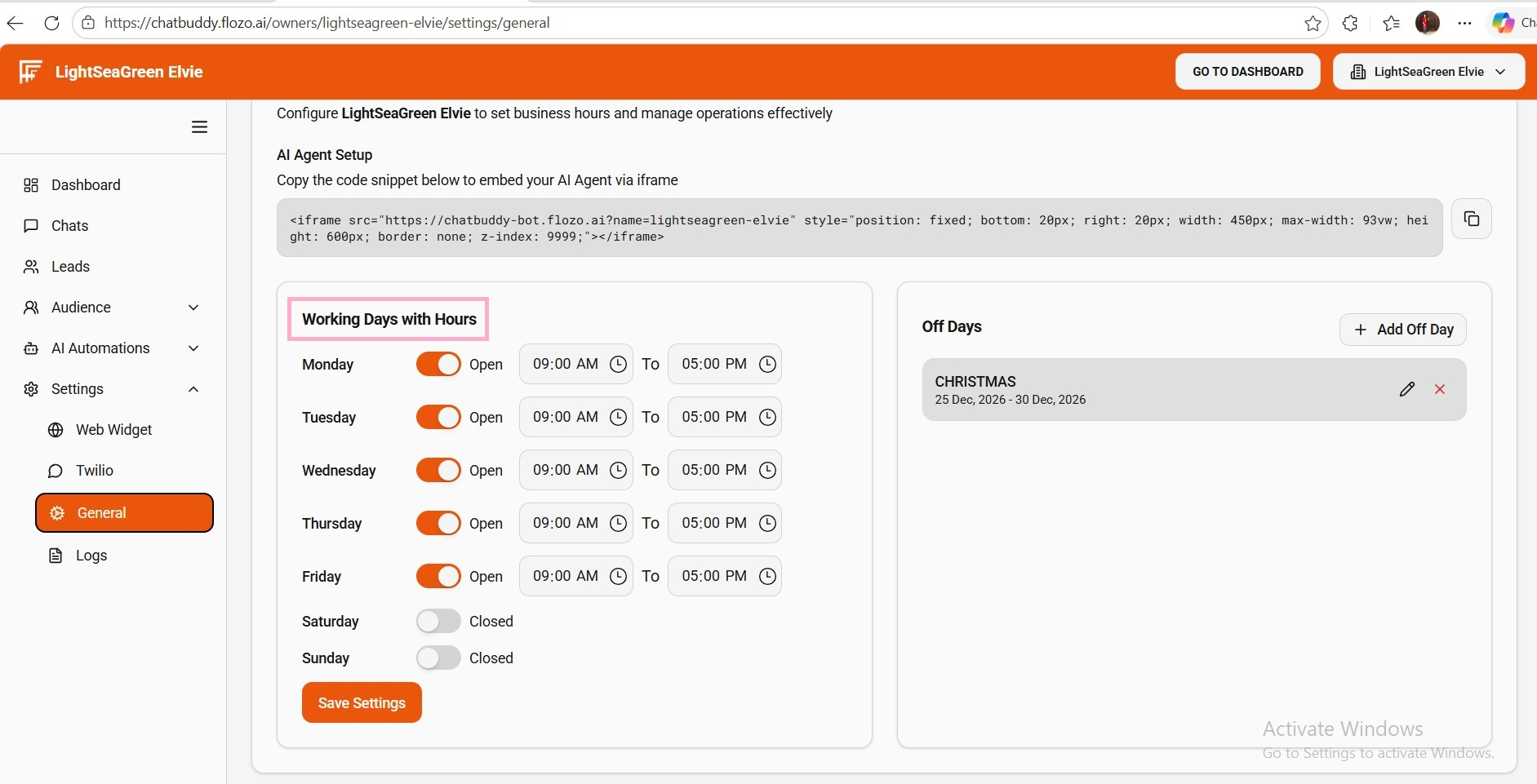
  3. Select the active working days and adjust the Start and End times as needed.

  4. Click Save Settings.

  5. The updated working schedule will be applied to the business.

Related Articles

  • How to Register a Business on Flozo?
  • How to Access the Business Owner Dashboard?
  • How to Update a Business Name?
  • How to Upload Business Logo?
  • How to Deactivate a Business?

Browse Categories

Flozo(19)Chatbuddy(40)QuotePilot(20)Workmate(34)

Was this article helpful? Still need help?

Submit a ticket